
Important Online Shopping Tips to Keep You Safe
What You Need to Know About Online Shopping
Quick Answer
Online shopping is convenient, but it comes with risks if you are not careful. Use these simple steps to protect your money, your accounts, and your personal information.
With the ability to buy almost anything online, more consumers are making purchases online today than ever before.
Recent statistics show that a significant percentage of consumers prefer to shop online because of the convenience, variety, and often better prices. However, this increase in online shopping activity also attracts more scammers and fraudulent activities aimed at unsuspecting shoppers.
At LendNation, we are committed to helping our customers with getting the cash they need with direct loans and providing smart financial tips. The rise in online shopping is not just a trend, but a new standard. Here’s how you can protect yourself while shopping online.
Be Careful of the “Too Good to Be True” Offers
Scammers often attract victims with deals that seem too good to be true. Bad actors will encourage you to give in to impulse buying with these enchanting deals. It’s better to be highly skeptical of extremely low prices on usually expensive items when shopping online.
There are unfortunately many of these “too good to be true” deals that are advertised on social media or appear through unsolicited emails. These offers can lead customers to fraudulent websites designed to steal your money and personal information.
Make Purchases on Websites with Active SSL Certificates (HTTPS)
Start with websites you know, or ones you can verify. Scammers often copy logos and layouts, so the safest choice is a trusted retailer or a site recommended by someone you know.
- Check for spelling errors or unusual URLs that signal a copycat site.
- Read a few recent reviews to confirm the seller is active and legitimate.
- Look for working customer support or a return policy you can view without logging in.
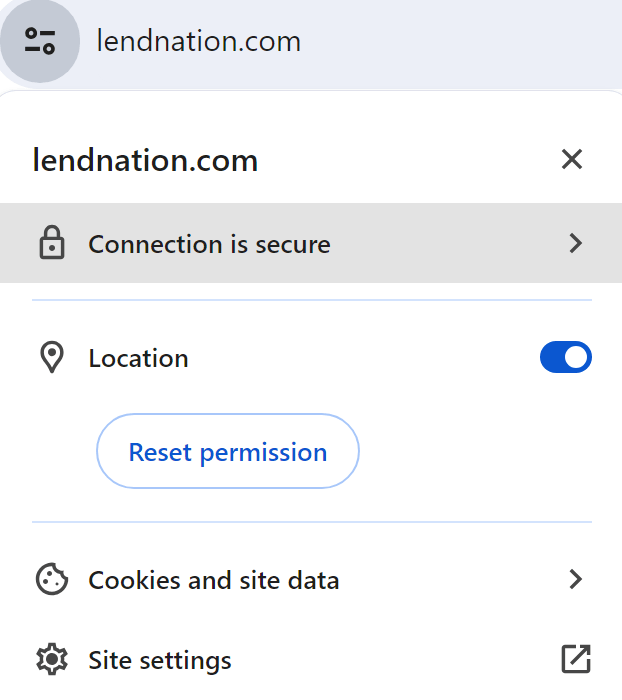
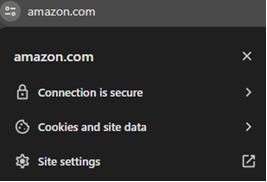
- Always check the URL of any website you visit. It should begin with “https” rather than just “http” (hypertext transfer protocol).
This simple check can help protect your sensitive information from being stolen. Here is an example of what to look for in your web browser when shopping safely online.
Research the Seller Before Making Purchases
Before you buy anything, especially from new or unfamiliar websites, do some homework. Check reviews and ratings from other customers and research the seller. Sites like the Better Business Bureau (BBB) have scam trackers to help you see if they have been scammed, and you can review reported scams or fraudulent activities. You can also read online reviews and news articles about the business.
Routinely Review Your Bank Accounts
Make it a habit with these simple steps:
- Set Up Real-Time Alerts In your bank’s mobile app, turn on text or push notifications for every purchase, withdrawal, or low-balance warning. Spot fraud in minutes.
- Schedule Weekly 2-Minute Scans Every Monday (or payday), log in, and skim the last 7 days of transactions. Look for anything unfamiliar. Small test charges are a red flag.
- Act Fast on Suspicious Activity See something off? Freeze your card instantly in the app and call your bank. Most issuers reverse unauthorized charges within 48 hours if reported quickly.
Pro Tip: Link accounts to a free tool like Mint or your bank’s dashboard for a single-view summary.
Use Strong, Unique Passwords for All Online Accounts
One of the most important things you can do to protect yourself when shopping online is using strong and unique passwords for each website. Strong passwords should have a combination of letters, numbers, and symbols.
This layer of security prevents a security breach on one site from compromising your accounts on others. You may also consider using a password manager to generate and store complex passwords to help you keep track of multiple passwords.
Do Not Give Out Unnecessary Personal Information
Be careful about the amount of personal information you provide when shopping online. A legitimate seller will need details necessary to complete a purchase. But any request for information beyond that—such as your Social Security number or bank PIN—is a red flag.
- Do not save your card number on every site.
- Use strong passwords and avoid reusing the same one.
- Watch for checkout pages that ask for your Social Security number.
But any request for information beyond that—such as your Social Security number or bank PIN—is a red flag.
Avoid Fraudulent Gift Card Exchanges
Gift cards are a popular way to shop or give as a gift, but they are also a frequent target for scams. Stay safe with these simple rules:
- Buy Only from Official Sources Purchase gift cards directly from the brand’s website or store (Amazon, Target, Walmart, etc.). Skip third-party marketplaces like Craigslist or random Facebook posts.
- Check for Tampering Before Buying In-store? Look for scratch-off panels that are intact and sealed packaging. Online? Avoid sellers with zero reviews or prices too good to be true.
- Never Share Gift Card Codes Publicly Treat the code like cash. Don’t post it online or send it via email unless you’re 100% sure of the recipient. Scammers drain cards in seconds.
- Redeem Immediately After Purchase Load the card to your account right away. Even legit cards can be targeted if the code leaks before you use it.
Install & Use Security Apps
Boost your device’s protection in minutes with these smart steps:
- Download a Trusted Antivirus App Install a top-rated app like Norton, McAfee, or Bitdefender (free versions work great). Run a full scan weekly to catch hidden malware before it steals your data.
- Enable Real-Time Web Protection Turn on the app’s safe browsing feature. It blocks phishing sites and warns you before you click risky links in emails or texts.
- Keep Everything Auto-Updated Allow the security app (and your phone) to update automatically. New threats pop up daily, and patches close the door on hackers.
- Add a VPN for Public Wi-Fi Use a free or low-cost VPN (like ProtonVPN or NordVPN) when shopping on coffee shop Wi-Fi. It encrypts your connection so snoopers can’t see your card details.
Shop Safe, Spend Smart. Apply with LendNation Today.
You now have the tools to shop online without worry: strong passwords, secure sites, real-time alerts, and scam-proof gift cards.
Need extra cash for holiday gifts fast and safely? Get an instant decision in minutes with LendNation. Apply Now. Safe, Simple, Secure.
Stay protected. Stay in control. Keep reading the LendNation Blog for more money-smart tips.
Resources:
- https://www.pcmag.com/explainers/tips-for-safer-online-shopping
- https://www.bbb.org/scamtracker
- https://www.tidio.com/blog/online-shopping-statistics/
- https://www.lendnation.com/blog/article/how-to-stop-impulse-shopping/
- https://www.lendnation.com/blog/article/money-saving-hacks-for-everyday-household-expenses/
- https://www.lendnation.com/blog/article/how-to-use-instant-debit-card-funding-for-the-holidays/
- https://www.lendnation.com/blog/article/top-10-money-saving-hacks-to-try-in-2024/
- https://www.lendnation.com/apply/